Stay updated with new assignment offers delivered directly to your phone via SMS!
Dwelling Blocks new SMS notification feature allows vendors to respond faster to new opportunities — even when away from email.
What Are SMS Offer Notifications?
When enabled in your account, Dwelling Blocks will send you a text message every time you receive a new assignment offer.
Only new offers are sent — no updates, cancellations, or other notifications.
Messages are sent 24/7 — there is no way to schedule or restrict delivery time.
How to Activate SMS Notifications
Log into your Dwelling Blocks account.
Go to Subscriptions in your company account settings (*Note: this is only visible for users with administrator role permissions).
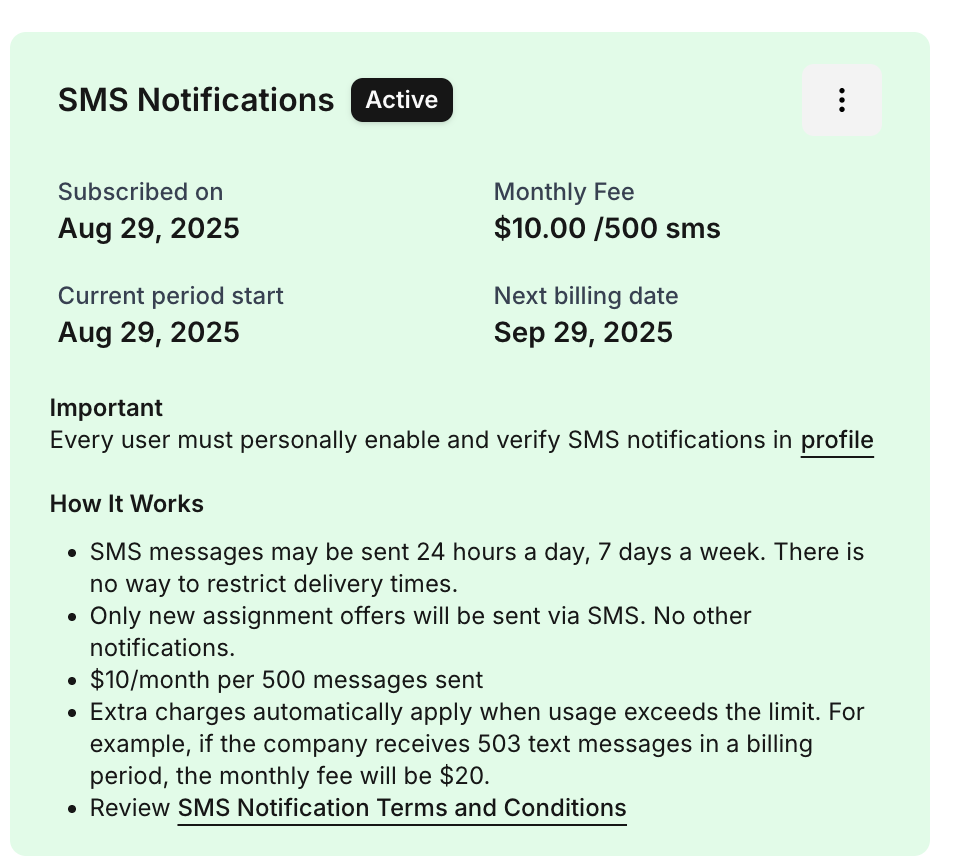
Locate SMS Notifications in the list of available subscriptions.
Click Activate.
Note: Activation is only possible if a credit card is added to your company account. Please add a credit card here before activating the subscription.The subscription will show as Active, and you will see:
Subscription date
Monthly fee
Current billing cycle and next billing date
- Go to your profile notifications
- Toggle Offer Notifications via SMS ON.
Phone Number Verification
You will see a screen like this:
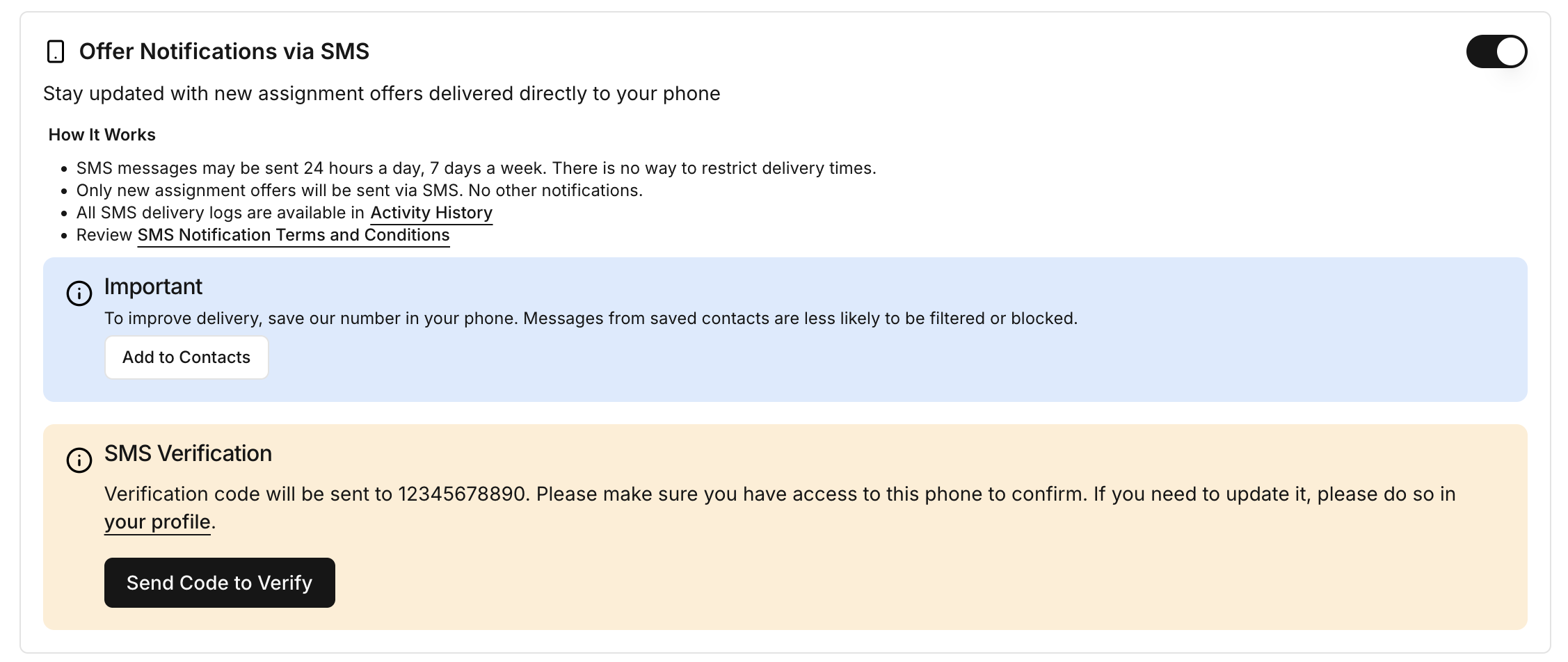
Verify your phone number and click Send Code to Verify.
Enter the Verification Code
After you click Send Code to Verify, you’ll receive a text message with a verification code.
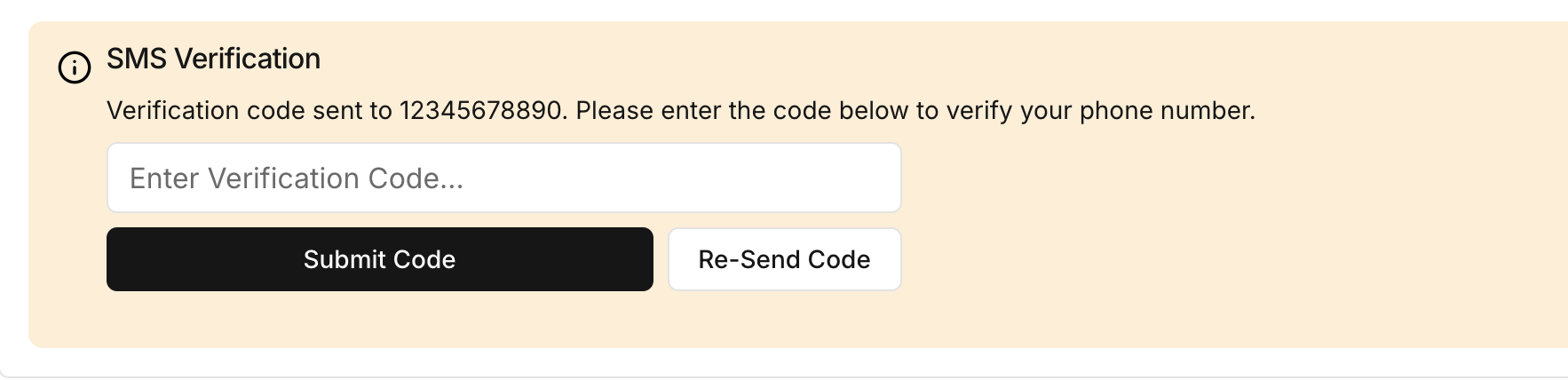
Enter the code you received via SMS
Click Submit Code to complete verification
If the code does not arrive within a few minutes, click Re-Send Code to try again
Once your phone is verified, the SMS Notifications subscription will show as Active.
Phone Number Verification
You will see a screen like this:
Verify your phone number and click Send Code to Verify.
Enter the Verification Code
After you click Send Code to Verify, you’ll receive a text message with a verification code.
Enter the code you received via SMS
Click Submit Code to complete verification
If the code does not arrive within a few minutes, click Re-Send Code to try again
Once your phone is verified, the SMS Notifications subscription will show as Active.
How to Stop or Restart SMS Notifications
If you are subscribed to Offer Notifications via SMS, you can manage your subscription at any time directly from your phone by replying to the text messages.
Reply HELP
You’ll receive a message with support information:
Dwelling Blocks Help: You're subscribed to assignment notifications. For support contact support@dwellingblocks.com, visit https://dbx.sh/notifications, or call 1‑888‑401‑8250. Reply STOP to opt out or HELP for this info.
Reply STOP
You’ll stop receiving all SMS offer notifications to your phone:
You have been unsubscribed from Dwelling Blocks SMS notifications. No further assignment messages will be sent to this number. Text back 'JOIN' or contact support@dwellingblocks.com to receive messages again.
Reply JOIN
If you previously unsubscribed and want to start receiving Offer Notifications via SMS again.
Important:
If you reply STOP, the change takes effect immediately for your phone number.
Replying JOIN after STOP will re‑activate SMS notifications without needing to verify your phone again (unless your phone number changed).
Even if unsubscribed via STOP, you can still receive offer notifications by email if enabled in your profile settings.
You can also manage your subscription and phone verification through your Dwelling Blocks profile.
Rules & Important Notes
Delivery times cannot be limited or restricted.
SMS messages may be sent 24 hours/day, 7 days/week
Only new assignment offers are sent via SMS — no other notification types are included.
Charges are based on messages sent to all company users, not offers accepted.
All SMS delivery logs are accessible from user’s Profile Activity History.
You can review full SMS Notification Terms and Conditions from the link in your profile settings.
If you update your profile phone number, don't forget to verify it again using the SMS verification code.
Was this article helpful?
That’s Great!
Thank you for your feedback
Sorry! We couldn't be helpful
Thank you for your feedback
Feedback sent
We appreciate your effort and will try to fix the article