When a client sends out a new order assignment, if you are assigned to the order you will receive an assignment offer via email and within the Dwelling Blocks platform. It's important these offers are acknowledged before the expiration to provide the best service to your clients, which is why they are a key scorecard performance metric.
Where to Find New Assignment Offers
New assignment offers will be emailed to you and are located in the Offers section on the left navigation panel of Dwelling Blocks. A number next to Offers indicates the outstanding offers waiting for your response.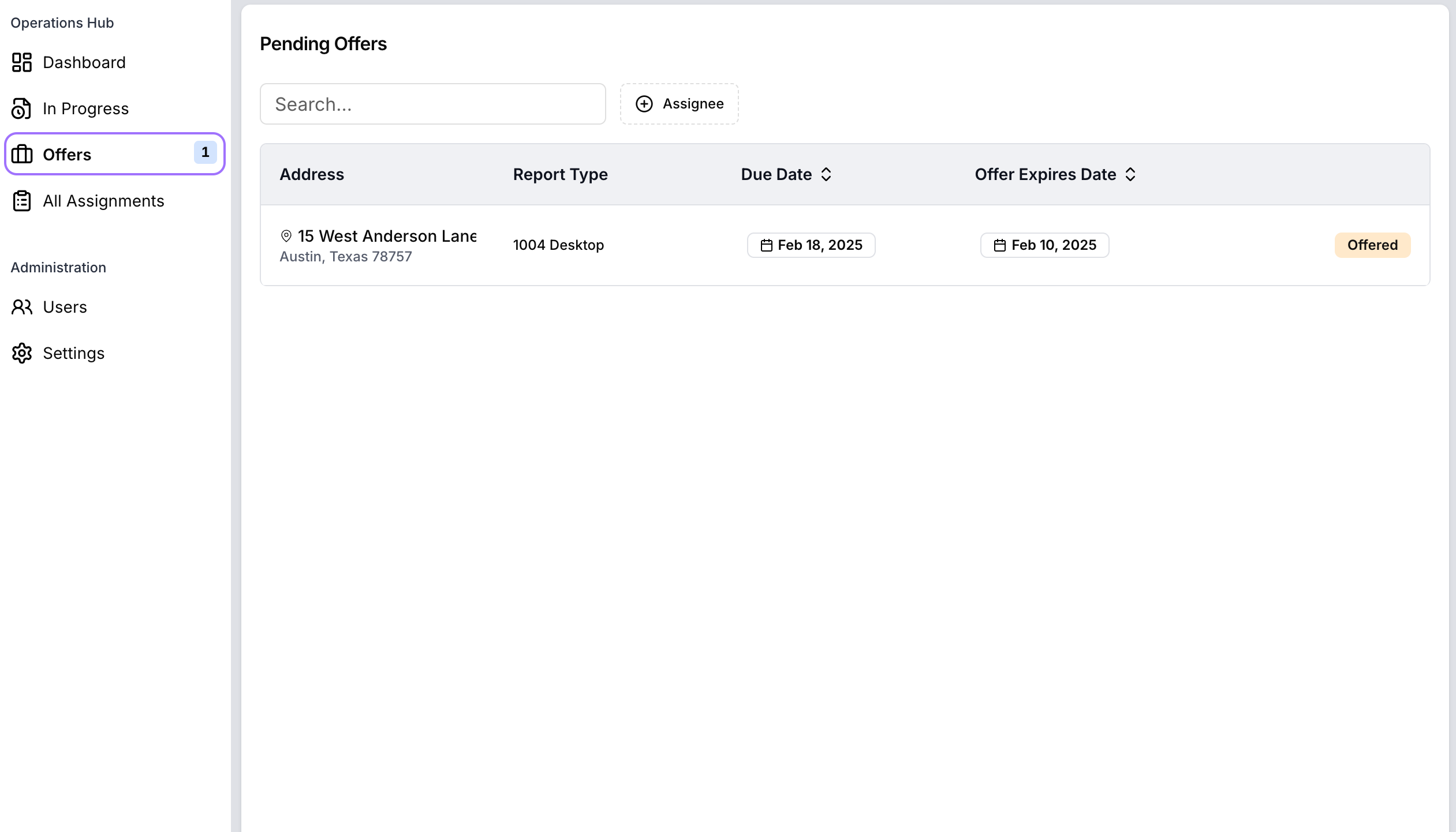
Reviewing and Accepting an Offer
To accept a new assignment:
- Click on the link on the Email to take you straight to the offer.
- If already logged in, navigate to Offers in the left menu of the main navigation.
- Select the offer you want to review.
- Carefully check all details, including the due date, fee and report requirements.
- Take note of the expiry date - this is the deadline to accept or reject the assignment.
- Choose to Accept or Submit Conditions/Reject the offer.
Learn more about Submit Conditions/Reject here
Was this article helpful?
That’s Great!
Thank you for your feedback
Sorry! We couldn't be helpful
Thank you for your feedback
Feedback sent
We appreciate your effort and will try to fix the article